
I Built My Family a Chief of Staff. It Runs on a Raspberry Pi.
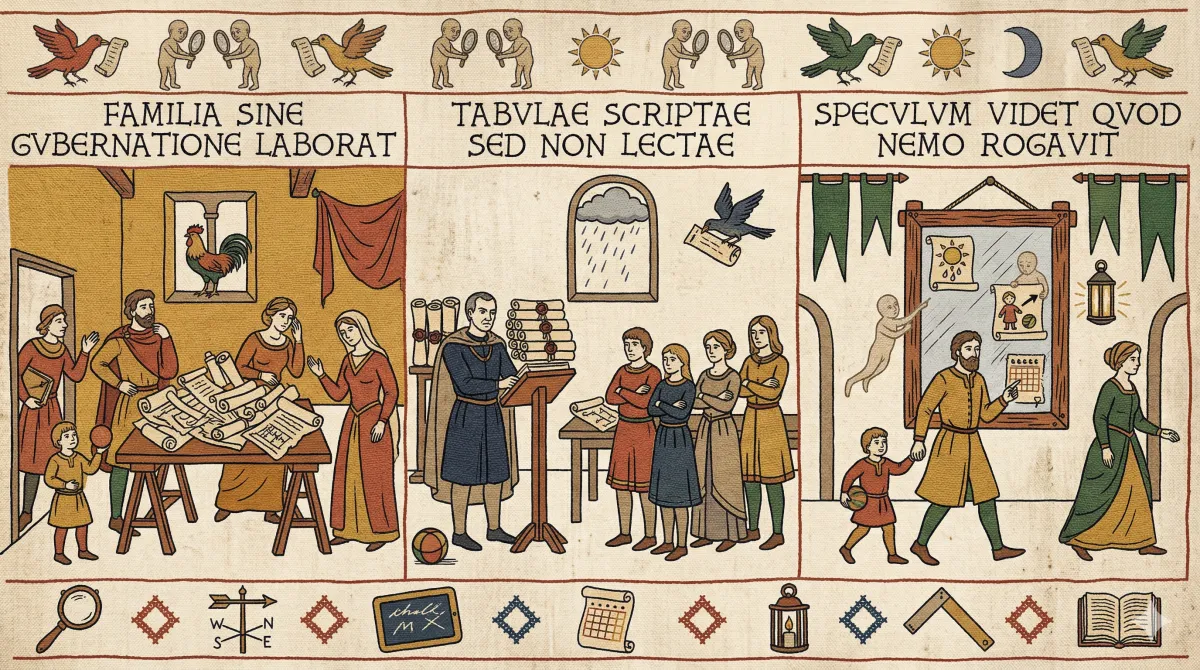
Saturday morning, 08:15. I walk past the mirror in the living room and it tells me something I had not thought to check.
Susie is at her staff conference all day Saturday but Tom has Hurricanes at 08:45 - Ben will need to take him.
Nobody asked for that. Nobody typed a question or tapped a screen. The mirror looked at the family calendar, noticed a conflict between two events, worked out which parent was unavailable, and surfaced the implication before I had my shoes on.
That, in a sentence, is what I built. And the fact that it works is still slightly surprising to me.
The Family Sentinel
The object on the wall
The Family Sentinel is a 32-inch smart mirror. Behind two-way glass sits a Samsung 4K display driven by a Raspberry Pi 4. It runs MagicMirror², the open-source smart mirror platform, with eleven custom modules I built from scratch using Claude Code.
The frame is handmade Ash with Walnut corner splines. I do a bit of woodworking as a hobby, and that mattered here. If the default state of this thing was an ugly black rectangle on the wall, it would have lasted about a week before my wife suggested we take it down. The mirror had to be furniture first and technology second.
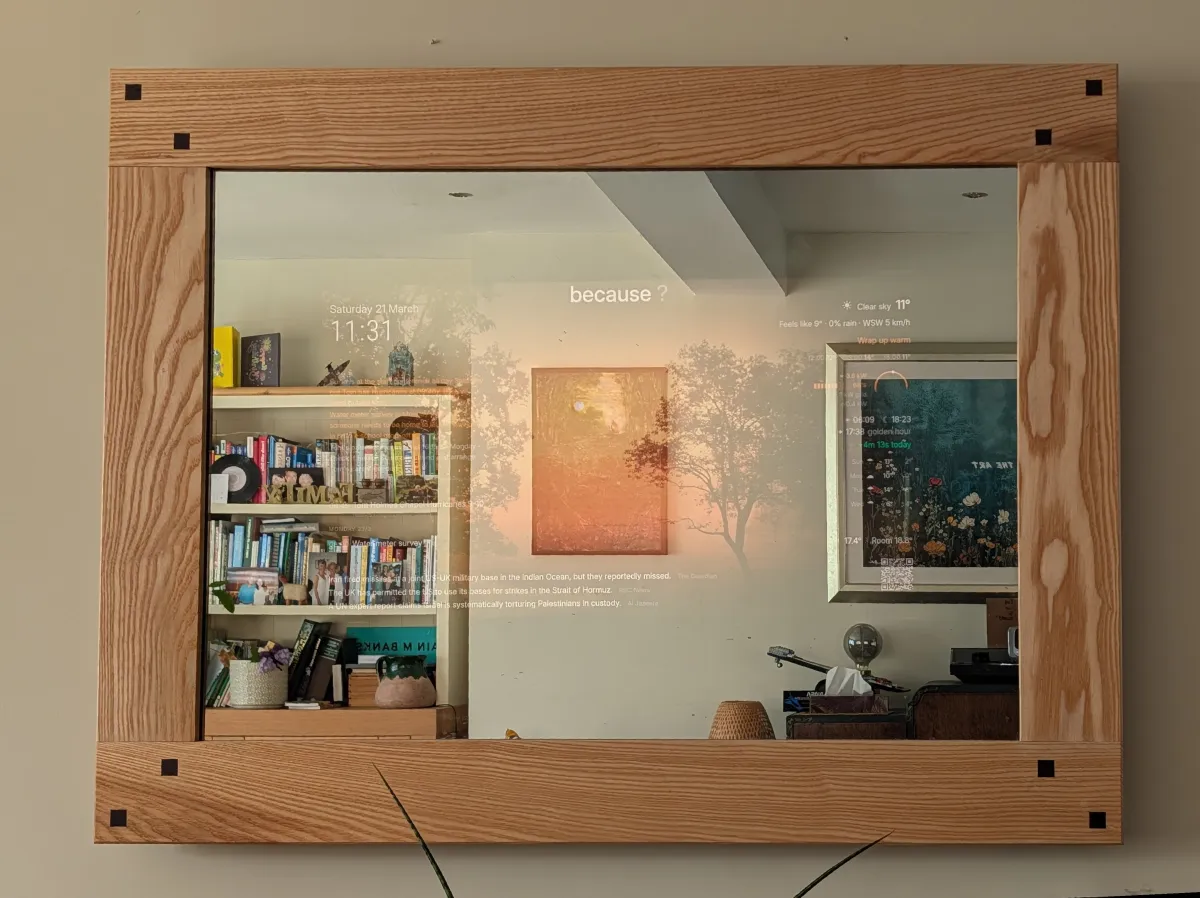
When the display is off, it is simply a mirror. When the display is on, text and images appear to float on the reflective surface. The Sunlight design system uses warm, high-contrast typography that stays readable at all times, even over ambient photos. Between photo transitions, there is a deliberate 2-3 second black gap where the screen becomes a mirror again. That transition, from photo to reflection to photo, is the moment visitors notice. It is genuinely a bit magical.
What it knows
The mirror pulls from eight data sources and uses three different AI models to make sense of what it finds. Here is what a typical weekday morning looks like.
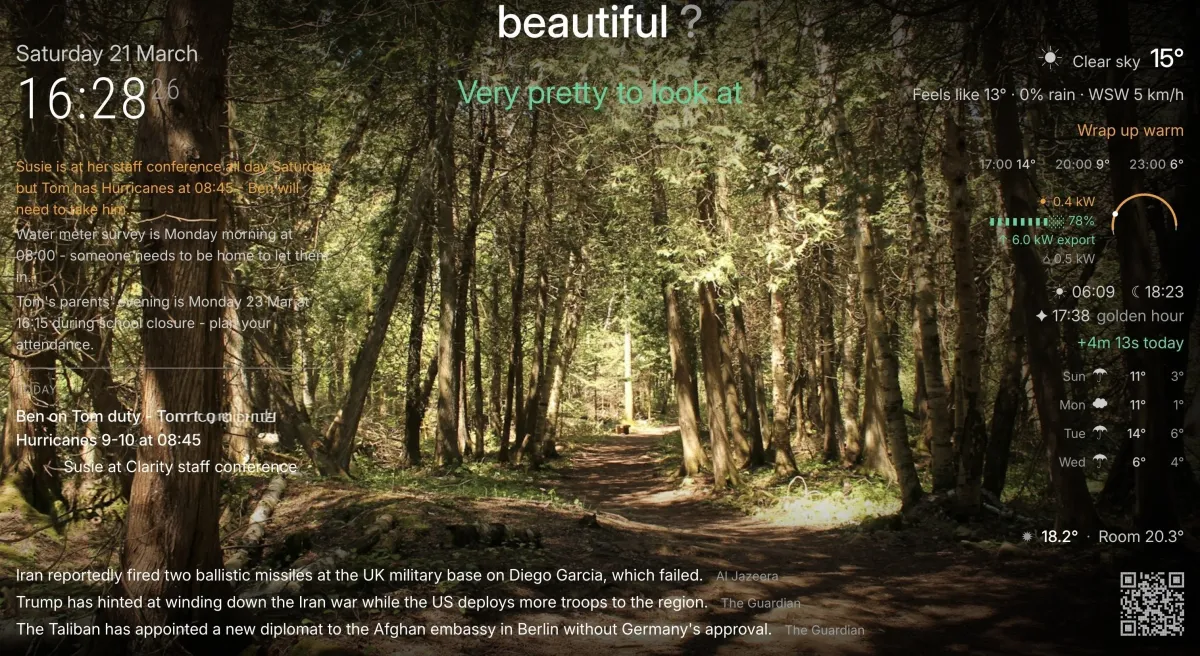
Calendar intelligence. Every event from our shared Google Calendar is classified by Claude Haiku 4.5. It identifies school events, after-school clubs, adult commitments, and birthdays. Then it reasons over them. If one parent is marked as away during school run hours, the mirror flags who is on pickup duty. It catches conflicts between overlapping events. It reminds us about parents’ evenings that fall during school closures. The classification is hash-cached, so the AI is only called when events actually change.
Weather and clothing. Current conditions, hourly forecast, five-day outlook, sunrise and sunset times, golden hour, and day length delta. If wind exceeds 30 mph, it suggests a coat. The weather module includes a daylight arc dial that also shows solar energy generation from our Tesla Powerwall, because sun position and solar output share visual context.
News curation. Six RSS feeds from the BBC, Guardian, Al Jazeera, DW News, and CheshireLive produce roughly 270 articles per cycle. Gemini 2.5 Flash Lite scores, deduplicates, and generates one-sentence factual summaries for each. This matters because the mirror cannot open links. RSS headlines are often clickbait. The AI replaces them with what actually happened.
Energy. Solar generation, battery state of charge, grid import and export, and home load from the Powerwall. When everything is normal, it shows nothing. Anomaly-first design: “EV at 80%” is noise. “EV at 12% and you drive to swimming at 4pm” is signal.
TomLearn. Daily Year 1 maths and English practice for my son, generated fresh each morning by Gemini Flash Lite. Twelve items rotating every 35 seconds with answer reveals. It stops at 7pm for bedtime. The generation runs at 05:50, ten minutes before the weekday wake-up, so items are ready when the display turns on.
Ambient photos. When the mirror is not showing logistics, it becomes a photo frame. An AI picks themes based on weather, time of day, season, and UK occasions, then fetches around 28 images from Unsplash, Pexels, and NASA’s Astronomy Picture of the Day. A rainy dawn gets a rainy dawn image. A clear sunset gets golden hour. The Sunlight typography floats over these images and remains readable throughout.
Two models, about 16p a day
One thing I am quite pleased with is that the AI layer is cheap, bounded, and purposeful. There is no single always-on model doing everything. Each task gets the cheapest model that can do it well. The total AI cost is roughly 16p per day. Eight pence for Haiku, eight pence for Flash Lite.
Claude Haiku 4.5 handles calendar classification. That task needs genuine reasoning: understanding that a staff conference plus a football fixture equals a solo school run for the other parent. Hash-based caching means Haiku is only called when the calendar data actually changes. On a quiet day, it might not be called at all.
Gemini 2.5 Flash Lite handles news scoring, ambient photo themes, and TomLearn content generation. These are structured output tasks: score these 100 headlines, pick a photo search query, generate twelve maths questions. They do not need Haiku’s reasoning ability, and Flash Lite is cheap enough that it barely registers.
I also built an AI morning briefing module. Claude Haiku would synthesise calendar, weather, and news into a narrative paragraph. It worked. And I turned it off. The briefing just narrated what the other modules already showed. It was AI doing busywork. The modules themselves were already doing the job.
That felt like an important lesson. The value is in reasoning over connections between data sources, not in generating prose for its own sake.
Two models, right-sized
Claude Haiku 4.5
Calendar classification and conflict reasoning. Needs genuine understanding of event relationships.
Hash-cached: only called when events change.
Gemini 2.5 Flash Lite
News scoring, photo themes, TomLearn content. Structured output tasks that do not need deep reasoning.
Briefing module built and shelved. It narrated what the other modules already showed. AI doing busywork.
A couple of weekends and some evenings with Drops of God
The entire codebase was built using Claude Code as the primary development tool. Sixty-eight commits over about a year, but the actual work was a couple of weekends and tinkering of an evening, sitting in the living room watching telly. The elapsed time sounds impressive. The reality is that it fitted comfortably around family life and a full-time job.
Every module follows a consistent architecture: a frontend that renders to the mirror, a backend Node.js helper for API calls, reusable logic functions, and unit tests. Sixty-five unit tests for the calendar module alone.
One of the cool things about working with Claude Code is that it can SSH directly onto the Pi. I sit at the breakfast table, make a change, and Claude Code deploys it, updates the module, and reloads MagicMirror² on the mirror across the room. I can watch it refresh while eating my toast. The deployment model is not sophisticated. It does not need to be.
Some design decisions came from physical constraints. Two-way mirror glass absorbs roughly 60% of light, which is why the Sunlight design system uses high-contrast warm typography rather than the muted greys you might use on a normal screen. The Pi 4 GPU cannot handle CSS blur or Ken Burns animations at 60fps, so those are banned. The body text is set at 24px rather than the usual 16px because you read this mirror from 2-3 metres away.
The self-healing OAuth is a detail I am quietly proud of. Google’s testing API limits refresh tokens to seven days. When they expire, the mirror displays the new authorisation code on screen. No SSH, no laptop. I just look at the mirror, type the code into my phone, and it reconnects. The system handles its own recovery.
Not always on
The mirror operates in modes, not as a permanent dashboard. Weekday mornings show the full logistics view: calendar, weather, news, energy, Tom Duty, TomLearn. When we leave for work and school, the Nest thermostat switches to Eco mode and the display turns off. Lunchtime is photos and a news ticker. After school is pickup logistics and clubs. Evenings are news and tomorrow’s preview.
At weekends it shifts to ambient mode: a beautiful photo frame with weather in the corner and TomLearn rotating quietly. When we go away, the Nest detects the empty house and the display stays off until someone comes home.
There is also a Guest Mode, toggled from a phone via Home Assistant. It locks to public content only: clock, weather, news, stock photos. No calendar events, no family data, no TomLearn. Privacy by design, not afterthought.
What surprised me
It gets things wrong sometimes. A calendar entry that is ambiguously named will occasionally produce a response that is technically accurate and contextually useless. The conflict detection logic is only as good as the data being fed to it, which means the mirror has also quietly become a nudge toward writing better calendar entries. (Unexpected benefit, genuinely.)
The biggest surprise is how quickly it became part of the household. Nobody says “check the mirror.” People just glance at it on the way past. The questions it answers are the ones you did not know you were about to ask: who is picking up Tom, do I need a coat, is the battery charged, what happened in the news. It reduces the ambient cognitive load of running a family.
(It will not be long before I have a go at getting it to send messages on my behalf. The coach’s details are already in my contacts, after all.)
The pattern hiding in the family project
I built this for my family. And I keep seeing the same design pattern in business contexts.
Most business AI implementations do one of two things: expensive always-on integrations that justify their cost by doing everything, or one-shot tools that answer questions when asked. Neither is what this mirror does. This is scheduled contextual reasoning over existing data. Cheap, bounded, purposeful. An AI that already knows your calendar and weather, reasoning over the connections between them, surfacing what matters before you think to ask. Sixteen pence a day.
A practice manager whose system notices a senior partner is double-booked the same week a major client filing is due. A university timetabling system that flags a room conflict three days before it becomes a crisis. A publishing production schedule that notices a designer is allocated to two simultaneous covers. None of those require transformation programmes. They require the same pattern I used on a Raspberry Pi.
The same pattern, different contexts
Accountancy
Senior partner double-booked the same week a major client filing is due.
Higher education
Room conflict flagged three days before it becomes a crisis.
Publishing
Designer allocated to two simultaneous covers.
Scheduled contextual reasoning over existing data. Cheap, bounded, purposeful.
The mirror moment
Between photo transitions, the screen goes black for two or three seconds. The display becomes an actual mirror. You see yourself, and then the next image fades in. I did not plan that. It was a side effect of the transition timing. And it turns out to be the thing people remember.
There is probably a metaphor in there about building systems that know when to show you something and when to simply reflect.
The backlog still includes Google Photos integration, full Home Assistant automation, and a post-twilight brightness curve. But the Family Sentinel already does what I built it for. It is the household Chief of Staff. It notices things. It reasons over them. And it tells us what matters, before we think to ask.
Related reading: Your Data Will Never Be Ready. Start Anyway. is the philosophy behind integrating imperfect data sources rather than waiting for perfect ones. The Coffee Link is about the ethos of building things because you want them, and leaving a polite door open for the people who find them useful. It Started with a Muddy Stick is another small thing built for the family, this time with a six-year-old as the design lead. Card Stash is another solo build, a loyalty card wallet that keeps everything on the device.